Obtaining meta information
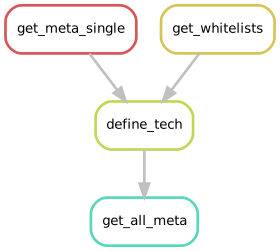
Above: Rule graph for obtaining meta information
Get dataset meta information
To obtain meta information we first use FFQ inside the
get_meta_single rule:
rule get_meta_single:
    params: dataset="{dataset}"
    output: ffq_json=config['out_dir'] +"/meta/{dataset}/ffq_raw.json",
    log: config['logs_dir'] + "/{dataset}/ffq.log"
    benchmark: config['logs_dir'] + "/{dataset}/ffq.benchmark"
    resources:
        mem_mb=4000
    conda: "../../envs/ffq.yaml"
    shell: """
    ffq -o {output.ffq_json} {params.dataset} 2> {log}
    if grep "error_msg" {output.ffq_json}; then exit 1; fi
    """
10x whitelists
The get_whitelistsis used to obtain 10x whitelists to further validate the raw data against
whitelists to identify chemistry version.
rule get_whitelists:
    output:
        whitelist_10x_v1 = config["resources"] + "/10xv1_whitelist.txt",
        whitelist_10x_v2 = config["resources"] + "/10xv2_whitelist.txt",
        whitelist_10x_v3 = config["resources"] + "/10xv3_whitelist.txt"
    conda: "../../envs/git.yaml"
    log: config["logs_dir"] + "/resources/get_whitelists.log"
    benchmark: config["logs_dir"] + "/resources/get_whitelists.benchmark"
    shell: """
    wget -o {log} -O {output.whitelist_10x_v1} https://github.com/10XGenomics/cellranger/raw/master/lib/python/cellranger/barcodes/737K-april-2014_rc.txt
    wget -o {log} -O {output.whitelist_10x_v2} https://github.com/10XGenomics/cellranger/raw/master/lib/python/cellranger/barcodes/737K-august-2016.txt
    wget -o {log}  https://github.com/10XGenomics/cellranger/raw/master/lib/python/cellranger/barcodes/3M-february-2018.txt.gz -O - | zcat > {output.whitelist_10x_v3}
    """
Defining technology
Once we obtained the meta information for a dataset, prefetched the files from SRA, and obtained the whitelists we can try to identify the technology that was used to generate the scRNA-seq dataset.
Currently supported technologies are 10X and Dropseq, but we plan to implement more technologies, since STAR allows to implement new technologies relatively easily.
This step contains several in-house scripts, the brief description of this step is below.
We first parse the XML from entrez to parse the technology name from descriptions and
library preparations protocols. For this step see parse_srs_for_tech in workflow/scripts/DefineTechnologyUtils.py.
We then try to identify which raw files should be used as an input for quantification.
Due to differences in which files were requested as raw files for submission (fastq or processed bam files) and
how these files were later processed in SRA, fastq-dump and parallel-fastq-dump
(which are recommended ways to obtain raw data from SRA) might in some cases return incomplete data
(as an example
Run SRR7425023
contains only biological reads and this is not enough to reconstruct scRNA-seq dataset).
If we can not identify barcode and cDNA read files in parallel-fastq-dump results we then look
at FTP files that can be also found in FFQ results.
Order in which we try the files:
- files from
parallel-fasqt-dump - fastq files from FTP
- bam files from FTP
if we can not identify barcode/cDNA information from any of these files (in that order),
or the dataset was generated using an unsupported technology,
define_tech must fail with an error providing context to why we couldn't identify technology.
Combining the results
While define_tech works on the level of a single dataset, our pipeline allows to works with
multiple datasets in the same time, so get_all_meta rule will concatenate modified jsons into one file
that will be used later by our pipeline to generate evaluation DAG for processing.